
Every B2B sales leader knows the pain of a leaky funnel. A prospect fills out a high-intent demo request, but it sits in an unmonitored inbox over the weekend. By Monday, they have already signed with a faster-moving competitor. Relying on manual lead follow-up, inconsistent qualification, and slow data entry inevitably leads to lost opportunities and frustratingly long sales cycles.
The modern solution is automating the sales pipeline. By intelligently connecting your CRM and engagement tools, you can move prospects seamlessly through the funnel with minimal manual intervention. Automation ensures no lead falls through the cracks and empowers reps to focus on closing rather than data entry.
In this guide, we will break down how to build a predictable, scalable revenue engine. We will cover automated lead capture, scoring, routing, outreach, deal advancement, and closure. Whether you are scaling a B2B SaaS company, optimizing a marketing agency, or streamlining a professional services firm, mastering sales pipeline automation is essential for driving consistent growth and improving overall sales productivity.
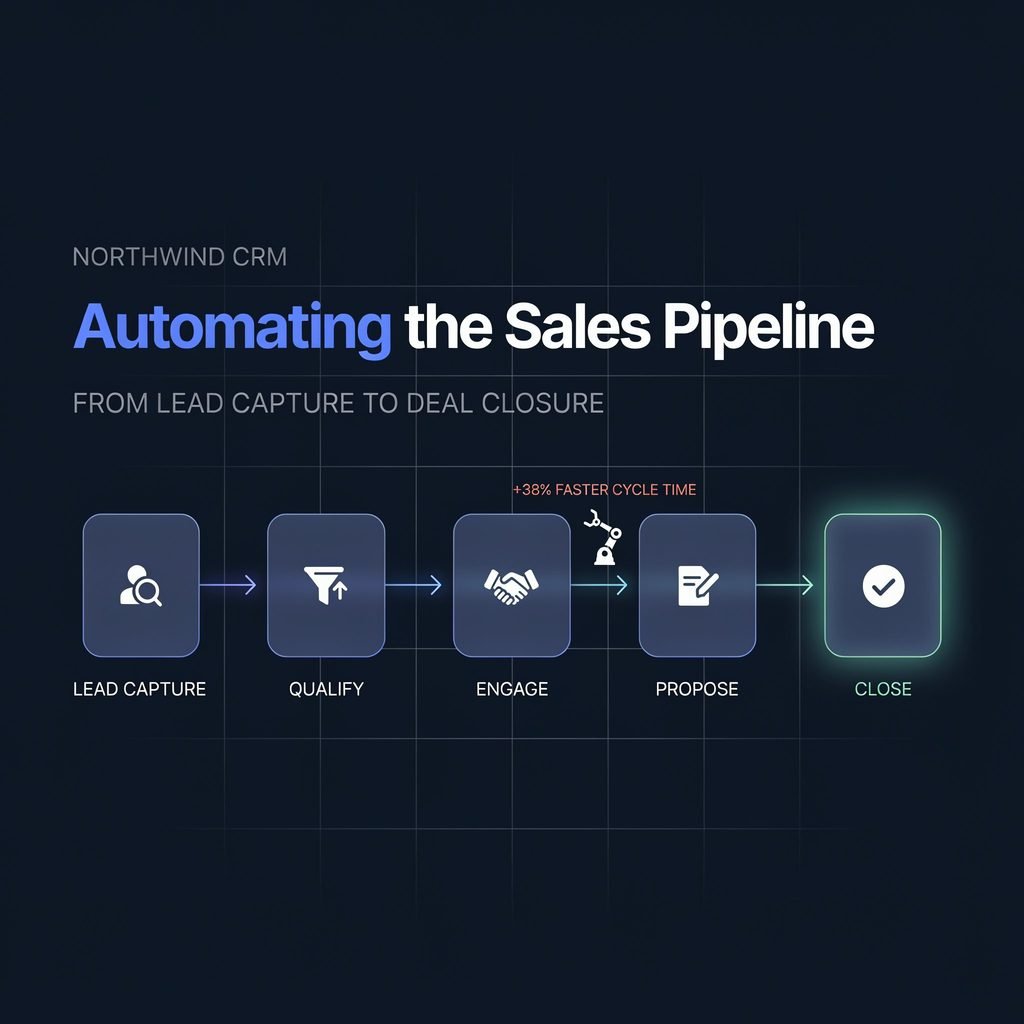
What Is Sales Pipeline Automation?
At its core, sales pipeline automation is the use of software to execute repetitive tasks, update records, and trigger actions as a prospect moves from initial contact to a closed deal. Instead of relying on sales reps to manually log emails, update deal stages, or assign leads, automated triggers and workflows handle the administrative heavy lifting.
It is important to differentiate between sales pipeline management and sales pipeline automation. Management refers to the strategic oversight of your funnel—analyzing win rates, coaching reps, and forecasting revenue. Automation, on the other hand, is the tactical execution layer. It is the system of CRM fields, workflow rules, and integrations that enforces your management strategy consistently across the entire team.
A robust automated pipeline relies on an ecosystem of interconnected tools. Your Customer Relationship Management (CRM) system acts as the central source of truth. Marketing automation software captures and nurtures top-of-funnel interest. Email sequencing and sales engagement platforms handle outbound outreach. Finally, workflow automation tools connect these systems, ensuring that a webinar registration instantly creates a qualified task in your CRM. While standard pipeline stages commonly include prospecting, qualification, discovery, proposal, negotiation, and closed won/lost, automation seamlessly bridges the gaps between these milestones.
Why Automating the Sales Pipeline Matters
Implementing sales pipeline automation transforms a chaotic, reactive sales floor into a predictable revenue machine. The business benefits extend far beyond simply saving time; they directly impact your bottom line and customer experience.
When you automate your pipeline, you achieve drastically faster lead response times. Studies consistently show that contacting a lead within five minutes increases conversion odds exponentially. Automation ensures instant acknowledgments and immediate routing to the right rep. You also benefit from better lead qualification and reduced manual data entry, meaning your CRM remains clean and actionable. Consistent, automated follow-up ensures that no prospect goes cold simply because a rep was busy closing another deal.
Furthermore, automation provides leadership with improved pipeline visibility and more accurate sales forecasting. When deal stages are updated automatically based on verifiable actions—like a signed mutual action plan or a completed discovery call—your revenue operations team can trust the data. This ultimately drives higher conversion rates, better alignment between sales and marketing, and improved overall sales productivity.
Consider a common scenario: A high-intent prospect visits your pricing page three times and submits an enterprise demo request on a Friday evening. Without automation, this lead sits idle until Monday morning. With automation, the system instantly enriches the lead’s company data, scores them as a high-fit enterprise prospect, routes them to your senior account executive, and sends a personalized calendar link. By Saturday morning, the meeting is booked. That is the power of an automated sales workflow.
The Core Stages of an Automated Sales Pipeline
Building a seamless flow requires mapping automation to every phase of the buyer’s journey. Here is how to apply CRM automation across the core sales pipeline stages.
Lead Capture
Lead capture automation goes far beyond a simple contact form. It involves pulling data into your CRM from website forms, chatbots, landing pages, LinkedIn lead gen forms, webinar registrations, and third-party intent data providers. A critical component here is automated data enrichment and duplicate prevention. When a new lead enters the system, automation should instantly append firmographic data (company size, revenue, tech stack) and check for existing records to prevent cluttering your database with duplicate contacts.
Lead Qualification
Not all leads are created equal. You can automate initial qualification using mandatory form fields and Ideal Customer Profile (ICP) matching. By integrating frameworks like BANT qualification (Budget, Authority, Need, Timeline) or CHAMP into your intake forms, the system can automatically flag leads that do not meet your minimum criteria, routing them to a low-touch nurture sequence instead of a sales rep.
Lead Scoring
Effective lead scoring blends demographic fit with behavioral intent. Automation tracks signals such as pricing-page visits, repeat website sessions, content downloads, email engagement, and webinar attendance. When a prospect’s behavioral score crosses a specific threshold, the system automatically flags them as a Sales Qualified Lead (SQL) and alerts the sales team.
Lead Routing
Speed-to-lead is critical. Automated lead routing assigns incoming SQLs to the correct rep instantly based on predefined rules like territory, deal size, industry, product line, language, or round-robin distribution. This eliminates the “cherry-picking” of leads and ensures equitable distribution across your team.
Automated Outreach and Follow-Up
Once a lead is assigned, automated follow-up emails and sales sequences take over. Using sales engagement platforms, reps can enroll prospects in multi-touch cadences featuring personalized templates, task reminders, and meeting scheduling links. Behavior-based triggers can pause sequences if a prospect replies or books a meeting, ensuring outreach remains relevant and timely.
Opportunity Management and Deal Advancement
As leads convert to opportunities, automation manages deal advancement. Standard stages include new lead, contacted, discovery scheduled, qualified opportunity, proposal sent, negotiation, and closed won/lost. Automation can mandate exit criteria before a rep can move a deal forward—for example, requiring a completed discovery call note before advancing to the “Proposal” stage. It also automatically creates follow-up tasks and notifies managers of stalled deals.
Proposal, Negotiation, and Contract Workflow
The bottom of the funnel requires heavy administrative work, which is perfect for deal closure automation. You can automate proposal generation using merged CRM data, trigger internal quote approvals based on discount thresholds, and send e-signature requests with automated document tracking. Stakeholder notifications ensure legal and finance teams are looped in the moment a contract is sent.
Deal Closure and Post-Sale Handoff
The sales handoff process is often where the customer experience breaks down. When a deal is marked “Closed Won,” automation should instantly trigger the onboarding workflow. This includes generating the initial invoice, scheduling the kickoff call, creating a customer success record, and sending a welcome packet. Conversely, “Closed Lost” deals should automatically trigger a re-engagement nurture campaign and require a mandatory lost-deal reason code for future analysis.
| Pipeline Stage | Automation Trigger | Recommended Action |
|---|---|---|
| Lead Capture | Form submission on website | Enrich data, check duplicates, create CRM record |
| Lead Scoring | Prospect visits pricing page | Add +10 points to behavioral score |
| Lead Routing | Lead score exceeds 80 | Assign to AE via round-robin, send Slack alert |
| Outreach | Lead assigned to rep | Enroll in 5-step automated email sequence |
| Deal Advancement | Discovery call marked “Complete” | Move deal to “Proposal” stage, generate task |
| Handoff | Contract signed (Closed Won) | Create onboarding project, alert Customer Success |
How to Build a Sales Automation Workflow Step by Step
Implementing sales pipeline automation requires a strategic approach. You cannot simply turn on every feature in your CRM and expect revenue to skyrocket. Follow this practical framework to build effective workflows.
- Audit the current sales process: Map out exactly how your team currently sells. Identify bottlenecks, shadow processes, and tools that do not communicate with one another.
- Map each pipeline stage and its exit criteria: Define exactly what must happen for a prospect to move from one stage to the next.
- Identify repetitive manual tasks: Look for high-volume, low-complexity tasks like data entry, meeting scheduling, and internal status updates.
- Define automation triggers, conditions, and actions: For every manual task, determine the event that starts the automation, the rules it must follow, and the outcome.
- Set up CRM fields and mandatory data requirements: Ensure your database is structured to support your automation rules.
- Build lead scoring and routing rules: Establish the baseline criteria for what constitutes a sales-ready lead and who should handle it.
- Create follow-up sequences and internal notifications: Build the actual email templates, task alerts, and Slack messages that will execute the workflow.
- Connect sales, marketing, and customer success tools: Use native integrations or middleware to ensure data flows seamlessly across departments.
- Test workflows before full rollout: Run sandbox tests to ensure triggers fire correctly and do not create infinite loops or duplicate records.
- Measure performance and optimize continuously: Review workflow analytics monthly to refine messaging and adjust scoring thresholds.
Crucially, involve your top-performing sales reps in this design phase. If automation feels like it is being forced upon the team by revenue operations without their input, adoption will be low. Gather their feedback on which automated follow-up emails sound authentic and which internal notifications are actually helpful versus overwhelming.
To visualize how this comes together, consider this simple automation example for a B2B SaaS company:
Trigger: Prospect submits an enterprise demo request form on the website.
Condition: Lead score is above 70, and company size is greater than 500 employees.
Actions:
- Create a new CRM contact and company record.
- Enrich the record with firmographic data.
- Assign the lead to the Enterprise Sales team via round-robin.
- Send a personalized confirmation email with a Calendly link.
- Create a high-priority follow-up task for the assigned rep.
- Notify the “Enterprise Deals” Slack channel.
- Add the lead to a pre-demo automated nurture sequence.
By structuring your implementation around clear triggers and verifiable conditions, you build a sales automation workflow that scales reliably alongside your business.
Best Practices for Sales Pipeline Automation
To ensure your automated systems drive revenue rather than frustrate your team and prospects, adhere to these core best practices:
- Do not automate every task: Keep human judgment for complex, high-stakes enterprise deals. Automation should handle the administrative burden, not replace strategic relationship building.
- Keep pipeline stages simple: Align your CRM stages directly with the actual buying process. Too many micro-stages lead to messy data and confused reps.
- Avoid automatically moving deals forward: Never advance a deal stage without verified qualification. If a rep hasn’t logged a discovery call, the system should block the deal from moving to the “Proposal” stage.
- Use clean CRM data: Automation is only as good as the data it relies on. Enforce required fields and regularly run data hygiene scripts to merge duplicates and update stale records.
- Personalize automated messages: Use dynamic fields (like company name, industry, or recent content downloads) to ensure automated follow-up emails feel tailored, not robotic.
- Set service-level agreements (SLAs): Define clear internal SLAs for follow-up. For example, mandate that all routed SQLs must be contacted within two business hours, and use automation to escalate unworked leads to managers.
- Give sales reps visibility: Ensure reps can easily see which automated emails have been sent and which sequences a prospect is currently enrolled in, preventing awkward duplicate outreach.
- Review automation performance monthly: Treat your workflows like living assets. A/B test email subject lines, adjust lead scoring weights based on actual conversion data, and retire underperforming sequences.
- Protect customer data: Ensure all your automated workflows comply with privacy regulations like GDPR and CCPA, particularly regarding automated unsubscribe handling and data retention policies.
Ultimately, the best automation feels invisible to the buyer while making the seller look incredibly organized and responsive.
Common Mistakes to Avoid
Even well-intentioned RevOps teams can derail their pipeline automation efforts by falling into common traps.
The most frequent error is over-automation. Attempting to automate highly nuanced negotiation tactics or complex proposal customizations often results in rigid, frustrating experiences for both reps and buyers. Similarly, poor lead scoring can flood your sales team with unqualified leads, causing them to ignore the system entirely.
Another major pitfall is relying on generic follow-up emails. If every automated touchpoint sounds like a mass marketing blast, prospects will tune out, and your domain reputation may suffer. Disconnected tools also create massive blind spots; if your marketing automation platform doesn’t sync properly with your CRM, reps will lack the context needed to close deals.
Furthermore, dirty CRM data will break your workflows. If duplicate records exist, automated routing will fail, and reps will waste time calling the wrong contacts. Unclear ownership of automated processes leads to “orphaned” leads when reps leave the company. Finally, the cardinal sin is automating a broken sales process. Automation acts as a multiplier; if your underlying sales methodology is flawed or your value proposition is weak, automation will simply help you lose deals faster. Fix the process first, then automate it.
Key Metrics to Track
You cannot improve what you do not measure. To prove the ROI of your CRM automation, track these critical sales metrics:
- Lead response time: Measure the average time between a lead entering the CRM and the first human or automated touch. Automation should drive this down to near zero.
- Lead-to-opportunity conversion rate: Track how many captured leads successfully pass through your automated qualification gates to become active pipeline.
- MQL-to-SQL conversion rate: Monitor the quality of marketing-generated leads and the accuracy of your automated scoring models.
- Sales cycle length: Effective automation removes administrative friction, which should noticeably shorten the time it takes to move from discovery to closed-won.
- Pipeline coverage: Ensure your automated outbound and inbound systems are generating enough qualified volume to meet revenue targets.
- Win rate: Analyze whether automated follow-ups and standardized deal advancement are helping reps close a higher percentage of deals.
- Average deal size: Track if automated cross-sell prompts or proposal builders are increasing contract values.
- Forecast accuracy: Compare automated pipeline projections against actual closed revenue to validate the integrity of your stage exit criteria.
- Follow-up completion rate: Measure how often reps complete the automated tasks assigned to them.
- Closed-won revenue: The ultimate metric tying your sales productivity efforts directly to the bottom line.
Conclusion
Automating the sales pipeline is not about replacing your salespeople with robots; it is about removing the repetitive, manual work that keeps them away from actual selling. By systematically connecting lead capture, intelligent qualification, CRM workflow automation, and seamless deal closure, you build a predictable engine that scales with your business.
When your revenue operations are running smoothly, your reps can focus entirely on what humans do best: building relationships, uncovering complex pain points, and negotiating win-win agreements. The technology handles the busywork, ensuring no opportunity slips through the cracks and every prospect receives a timely, professional experience.
Ready to transform your revenue engine? Start by auditing your current pipeline today. Identify three high-friction manual tasks—like lead routing or follow-up scheduling—and build your first automated workflows this week. If you need help mapping your strategy, consider booking a CRM automation demo with a revenue operations expert to see what a fully optimized sales process looks like in action.
Frequently Asked Questions (FAQs)
1. What is the best CRM for sales pipeline automation?
The “best” CRM depends on your company size and complexity. HubSpot is excellent for mid-market companies seeking an all-in-one inbound solution, Salesforce offers unparalleled customization for enterprise RevOps teams, and Pipedrive or Close are highly effective for SMBs focused heavily on outbound sales productivity.
2. How much does it cost to automate a sales pipeline?
Costs vary widely based on your tech stack. Basic automation using native CRM tools might only cost your existing software subscription fees. However, a robust enterprise stack involving a premium CRM, sales engagement platforms (like Outreach or Salesloft), data enrichment tools (like ZoomInfo), and middleware (like Zapier) can range from a few hundred to several thousand dollars per month.
3. Can small businesses benefit from sales automation?
Absolutely. Small businesses often have limited sales resources, making automation critical. Automating lead capture, follow-up emails, and meeting scheduling allows a small team (or a solo founder) to manage a high volume of leads without dropping the ball on customer service.
4. What is the difference between marketing automation and sales automation?
Marketing automation focuses on top-of-funnel activities: nurturing anonymous website visitors, managing email newsletters, and scoring leads until they are ready to talk to sales. Sales automation takes over once a lead is qualified, focusing on outreach cadences, pipeline management, task creation, and deal closure workflows.
5. How long does it take to implement sales pipeline automation?
A basic setup (automating lead capture and simple routing) can be completed in a few days. However, designing a comprehensive, multi-stage automated workflow with lead scoring, custom integrations, and SLA tracking typically takes 4 to 8 weeks of planning, building, and testing by a RevOps professional.
6. Will automation make my sales emails look like spam?
Only if implemented poorly. To avoid the spam folder, ensure you are using high-quality data, personalizing emails with dynamic fields, warming up your sending domains, and strictly honoring opt-out requests. Modern sales engagement platforms are designed to mimic human sending patterns to protect your deliverability.
7. How do I get my sales reps to adopt automated workflows?
Involve them in the design process. If reps help define the exit criteria for pipeline stages and write the templates for automated follow-up emails, they will view the system as a helpful assistant rather than a micromanagement tool. Additionally, ensure the automation saves them time rather than creating extra administrative clicks.
8. What tools integrate best for sales pipeline automation?
A standard best-in-class stack often includes Salesforce or HubSpot (CRM), Outreach or Apollo (Sales Engagement), Clearbit or ZoomInfo (Data Enrichment), DocuSign or PandaDoc (Proposals/Contracts), and Slack or Microsoft Teams (Internal Notifications). Middleware like Zapier or Make is frequently used to connect tools that lack native integrations.