
Key Components of an Effective Workflow Automation System
Picture this: your operations team is drowning in manual approvals, repetitive data entry, and fragmented tools. A simple purchase order requires five different email chains, and onboarding a new hire involves manually creating accounts across six different platforms. In today’s fast-paced digital economy, this level of manual friction isn’t just annoying—it’s a critical bottleneck.
At its core, workflow automation is the use of software to execute a sequence of tasks, data transfers, and approvals based on predefined rules, requiring minimal manual intervention. Instead of relying on human memory to move a process from step A to step B, an automated system handles the routing, notifications, and data syncing automatically.
Why does this matter so much in 2026? With rising labor costs, the permanence of remote and hybrid teams, and an ever-increasing demand for speed and accuracy, automation has shifted from a “nice-to-have” to a fundamental competitive advantage. Businesses that rely on manual processes simply cannot scale efficiently.
In this guide, we’ll break down the key components of an effective workflow automation system, explain how they work together, and show you how to evaluate or build a system that actually delivers ROI.
Before diving into the architecture, it is helpful to understand the immediate impact of getting this right. A well-designed system offers profound benefits:
- Massive time savings: Freeing up hundreds of hours previously lost to repetitive administrative tasks.
- Fewer errors: Eliminating the typos and missed steps inherent in manual data entry.
- Better visibility: Providing real-time tracking and audit trails for every process.
What Is a Workflow Automation System?
Before dissecting the anatomy of automation, we must establish a clear foundation. A workflow automation system is not just a simple “automation tool” or a basic macro. It is a comprehensive platform designed for end-to-end process orchestration across multiple steps, people, and applications.
To understand its scope, it helps to differentiate between three common tiers of automation:
- Task automation: Focuses on a single action or repetitive task within one application (e.g., automatically saving email attachments to a specific folder).
- Workflow automation: Manages multi-step, multi-system processes that involve conditional logic and hand-offs between different tools or team members (e.g., a lead submission triggering a CRM update, a Slack notification, and a follow-up email).
- Business process automation (BPA): An enterprise-wide approach that automates complex, cross-departmental workflows to achieve overarching strategic goals. (Learn more in our deep dive: What Is Business Process Automation?)
In 2026, modern organizations rely on workflow automation for a vast array of daily operations. Common workflow automation use cases include:
- Employee onboarding: Automatically provisioning IT access, assigning training modules, and scheduling introductory meetings.
- Purchase order approvals: Routing requests to the correct manager based on department and budget thresholds.
- Customer support ticket routing: Analyzing incoming queries and assigning them to the appropriate tier or specialist.
- Content publishing workflows: Moving drafts from writing to editing, legal review, and final CMS publication.
- Lead nurturing and CRM updates: Scoring inbound leads and triggering personalized email sequences. (See more examples in Workflow Automation Use Cases by Department)
To work well and deliver on these promises, any workflow automation system relies on a specific set of core components. Let’s explore the architecture that makes intelligent automation possible.
Core Components of an Effective Workflow Automation System
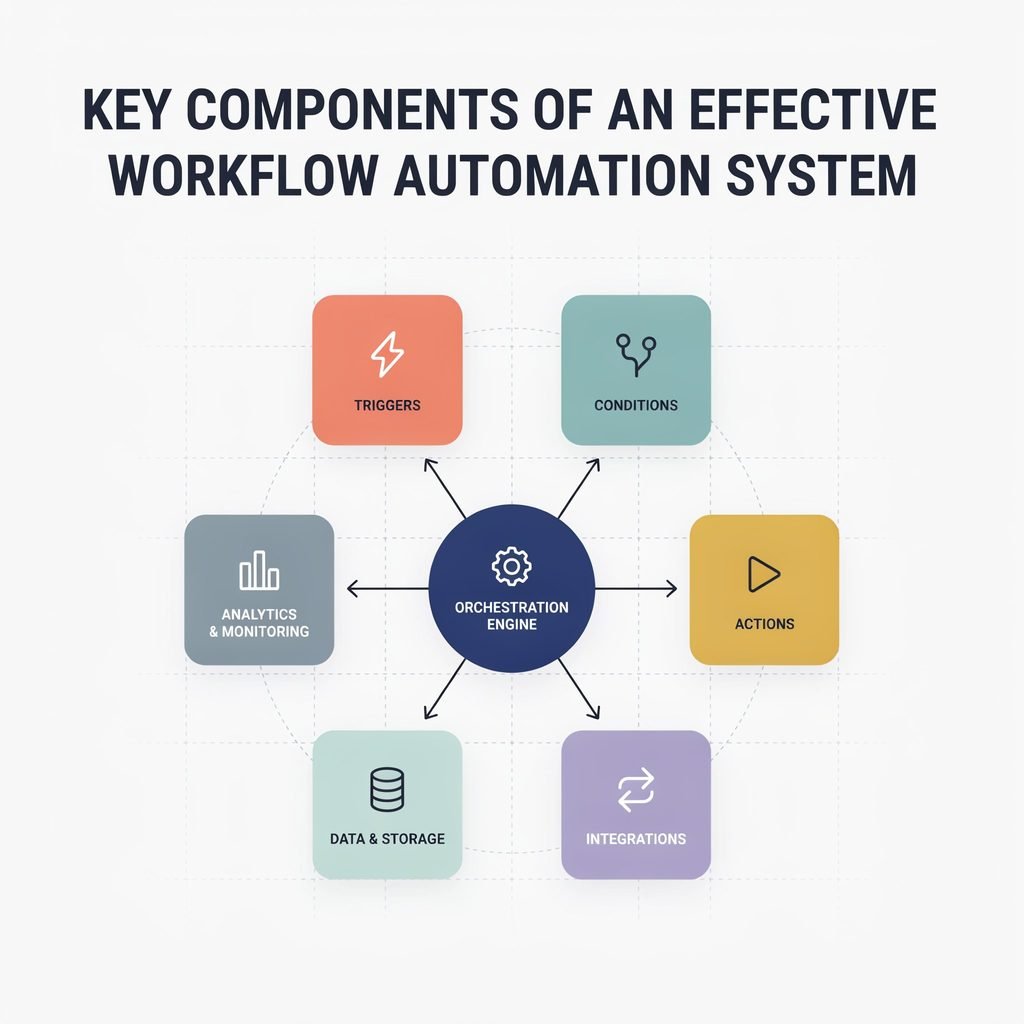
Building a robust process automation framework requires more than just connecting two apps together. It requires a structured workflow automation architecture comprised of several distinct layers. Here are the seven essential components that power effective automated workflows.
1. Trigger Layer: The Event That Starts the Workflow
Every automated process needs a starting line. In automated workflow design, a trigger is the specific event or condition that initiates the workflow. Without a reliable trigger layer, workflows would either run constantly (wasting resources) or fail to start when needed.
Triggers ensure that workflows start consistently and only when the exact right conditions are met. They generally fall into three categories:
- Event-based triggers: These fire when a specific action occurs in a connected system. Examples include a new form submission on a website, a task status changing to “Complete” in a project management tool, or a new record being added to a database.
- Time-based triggers: Also known as scheduled triggers or cron jobs, these initiate workflows at predefined intervals, such as generating a weekly compliance report every Monday at 9 a.m. or sending a renewal reminder 30 days before a contract expires.
- Manual triggers: Sometimes, human discretion is required to start a process. A manual trigger might be a button click in a dashboard that initiates a complex end-of-month financial reconciliation.
- Webhooks: Incoming data payloads from external systems that push information into your workflow engine in real-time.
Consider a practical example: When a prospective client fills out a “Request a Demo” contact form on your website, that submission acts as the event-driven trigger. It instantly wakes up the workflow, capturing the lead’s data and pushing it into your sales pipeline without a human ever lifting a finger. Mastering start conditions for workflow execution is the first step toward reliable automation.
2. Actions: The Tasks Executed Automatically
Once the trigger fires, the system must know what to do next. Actions are the specific, predefined tasks the system performs automatically. If triggers are the “when,” actions are the “what.”
In a robust workflow management system, actions can range from simple notifications to complex data manipulations. Common automated actions include:
- Sending an email, SMS, or Slack notification to a specific user or channel.
- Creating, updating, or archiving a task, ticket, or database record.
- Assigning work to a team member or dynamically routing it based on workload.
- Generating documents, such as dynamically populating a PDF contract or invoice using merged data.
- Calling an external API to sync data, enrich a record, or execute a payment.
The importance of clear, atomic action steps in automation cannot be overstated. Each step should be well-defined and singular in purpose so the workflow is easy to troubleshoot, audit, and optimize. Furthermore, modern platforms allow for multi-step actions and sequences, where one action inherently leads to another in a continuous chain (e.g., create a new client record → send a welcome email → schedule a 30-day follow-up task).
Ultimately, automated actions are where the workflow automation benefits are realized. They directly reduce manual effort, drastically speed up cycle times, and minimize the human errors that plague manual data entry.
3. Conditional Logic and Rules Engine
Real-world business processes rarely follow a single, perfectly linear path. They branch, loop, and require exceptions. This is where conditional logic in workflows becomes the brain of your operation.
Conditional logic relies on if/then rules that determine which path a workflow takes based on incoming data or contextual variables. This decision-making capability is critical for handling nuance. For example:
- If a purchase order request is greater than $5,000, then route it to the Finance Director for approval; otherwise, auto-approve it.
- If a lead source is tagged as “paid ads,” then assign it immediately to an Account Executive; if “organic search,” then add it to a long-term nurture sequence.
- If a required compliance document is missing from an onboarding packet, then pause the workflow and email the requester; if complete, then proceed to IT provisioning.
A sophisticated workflow rules engine supports various logic patterns, including:
- Filters: Including or excluding records based on specific criteria before they enter the workflow.
- Branches (If/Else paths): Creating divergent routes based on field values.
- Loops: Iterating through a list of items (like line items on an invoice) or repeating a step until a specific condition is met.
- Exceptions: Gracefully handling errors, outliers, or edge cases without breaking the entire process.
In enterprise environments, a centralized rules engine allows business analysts to define, update, and audit if-then logic in automation without requiring developers to rewrite the underlying code. This agility is a hallmark of mature business process automation.
4. Integrations and Connectivity Layer
An automation tool is only as powerful as the ecosystem it connects to. Workflow integrations and APIs form the connectivity layer, allowing your automation platform to communicate seamlessly with your CRM, ERP, email provider, chat applications, and cloud storage.
Integrations are non-negotiable. For a workflow to be truly effective, it must move data between disparate systems without requiring manual copy-pasting. Modern workflow automation platforms 2026 offer several ways to achieve system interoperability:
- Native connectors: Pre-built, maintained integrations for popular SaaS apps (e.g., Salesforce, HubSpot, Jira, Slack) that require minimal setup.
- Generic HTTP/REST API calls: Allowing the system to connect to virtually any custom internal tool or niche software by sending and receiving JSON/XML payloads.
- Webhooks: Both incoming (to trigger workflows) and outgoing (to notify external systems of workflow completion).
- Middleware/iPaaS layers: For highly complex enterprise environments, dedicated integration platforms can handle heavy data transformation before passing it to the workflow engine.
A crucial aspect of this layer is data mapping and transformation. Systems rarely speak the exact same language; a date format in your CRM might need to be transformed to match the requirements of your accounting software. The connectivity layer handles this normalization seamlessly.
Security is also paramount at this layer. Robust workflow automation software manages API keys securely, utilizes OAuth for authentication, and ensures encryption in transit. For instance, a workflow might pull lead data from a web form, enrich it via a third-party data API, push the qualified lead into a sales pipeline, and notify the account executive in Slack—all while maintaining strict data privacy standards.
5. Workflow Orchestration Engine
While triggers and actions handle the immediate steps, the workflow orchestration engine is the conductor of the entire symphony. It is the core component that tracks the state of each workflow run, sequences complex steps, handles pauses, and manages dependencies.
Orchestration is what separates simple, linear automations from true, enterprise-grade process automation frameworks. Some workflows are long-running, spanning hours, days, or even weeks. Consider a multi-stage vendor onboarding process that requires legal review, security audits, and finance approvals.
A robust orchestration engine provides critical capabilities:
- State management: The engine remembers exactly where each workflow instance is. If a server restarts or an API goes down temporarily, the workflow picks up exactly where it left off.
- Parallel vs. sequential execution: The ability to run multiple independent tasks at the same time (parallel) or enforce strict order (sequential).
- Timeout and retry logic: Automatically retrying a failed API call with exponential backoff, or escalating a task if it sits in a queue for too long.
- Human-in-the-loop automation: Seamlessly pausing the automated flow to wait for a human approval, sending a reminder if the human delays, and resuming the digital process once the button is clicked.
True orchestration ensures that complex, multi-actor processes run smoothly at scale. A high-quality engine can manage tens of thousands of concurrent, stateful workflows without dropping data or losing track of pending approvals.
6. Monitoring, Logging, and Analytics
“You can’t improve what you can’t see.” This adage is especially true for automation. Workflow monitoring and analytics provide the visibility required to ensure your systems are running smoothly and delivering value.
This component encompasses real-time dashboards, historical audit trails, and deep-dive logging. Key features of a strong monitoring layer include:
- Run history: A detailed ledger showing who or what triggered a workflow, exactly when it ran, the data payload it processed, and the final outcome (success, failed, or skipped).
- Error logs and failure notifications: Immediate alerts (via email or Slack) when a step fails, complete with stack traces or error codes to help IT teams troubleshoot instantly.
- Performance dashboards: Visualizations showing workflow volume, success rates, and average cycle times.
- Bottleneck identification: Analytics that highlight exactly where workflows are getting stuck (e.g., “Legal approvals are taking an average of 4.5 days, delaying the entire process”).
Workflow analytics tie directly to continuous improvement. By analyzing process data, operations managers can refine rules, reassign tasks, or redesign steps for better performance. Furthermore, in regulated industries like finance or healthcare, comprehensive audit trails are mandatory for compliance. A reliable logging system proves to auditors exactly who approved what, and when, ensuring total process visibility.
7. Governance, Security, and Access Control
As automation scales across an organization, the risks of data leaks, unauthorized changes, and “shadow IT” increase. Workflow automation security and compliance are maintained through strict governance and access controls.
Workflow governance encompasses the policies, version control, and environment separations (development, testing, production) that protect your automated infrastructure. Central to this is Role-Based Access Control (RBAC). Not everyone should have the ability to edit a critical financial workflow or view sensitive HR data. RBAC ensures that users only have the permissions necessary for their specific roles.
Security essentials in this layer include:
- Authentication: Enforcing Single Sign-On (SSO) and Multi-Factor Authentication (MFA) for anyone accessing the automation platform.
- Authorization: Granular controls over who can view, edit, publish, or manually trigger specific workflows.
- Data protection: Ensuring sensitive variables (like API keys or PII) are encrypted at rest and masked in logs.
- Compliance adherence: Building workflows that respect data retention policies and regional regulations like GDPR, HIPAA, or SOC 2.
Change management is also a key facet of governance. Effective teams use versioning to test workflow changes in a sandbox environment before deploying them to production. Strong governance builds trust; when stakeholders know the system is secure and heavily audited, they are far more willing to adopt intelligent workflow automation at an enterprise scale.
How These Components Work Together: A Practical Example
To truly understand the power of an effective workflow automation system, let’s walk through a concrete end-to-end example: an Automated Employee Onboarding Workflow.
When a candidate accepts an offer, the HR manager updates their status to “Hired” in the HRIS (Human Resources Information System).
- The Trigger: This status change acts as the event-based trigger, instantly waking up the onboarding workflow.
- Actions & Integrations: The system immediately integrates with your identity provider to create the employee’s corporate email and Slack accounts. Simultaneously, it triggers actions in your project management tool to create a standardized “New Hire” checklist.
- Conditional Logic: The workflow evaluates the new hire’s department. If the role is “Engineering,” it branches to assign code-repository access and specific security training. If the role is “Sales,” it routes them through CRM certification modules instead.
- Orchestration & Human-in-the-Loop: The workflow orchestrates parallel tasks: IT provisions hardware while Facilities prepares a desk. The system pauses, waiting for the IT manager to click “Approve” on a software license request (human-in-the-loop) before generating the final welcome packet.
- Monitoring: Throughout the employee’s first 30 days, HR uses dashboards to track completion rates, time-to-productivity, and any missing steps, ensuring no new hire falls through the cracks.
- Governance: Only authorized HR and IT admins have the RBAC permissions to edit this workflow, and every access grant is logged for security compliance.
This workflow automation example demonstrates how removing or weakening any single component reduces overall effectiveness. Without conditional logic, every employee gets the same irrelevant training. Without monitoring, HR remains blind to bottlenecks in IT provisioning. Together, they create a seamless integrated workflow process.
Evaluating or Building Your Workflow Automation System
Whether you are adopting an off-the-shelf SaaS product or developing an internal tool, you need a framework to assess its capabilities. Use this checklist for workflow automation platform evaluation:
- Flexibility: Does it support diverse triggers and complex, multi-layered conditional logic?
- Connectivity: Are the native integrations robust, and does it allow secure, custom API/webhook connections?
- Usability: Is there a visual, no-code workflow builder that empowers business users, alongside advanced modes for developers?
- Orchestration: Can it handle long-running, stateful workflows with human approvals and parallel processing?
- Visibility: Does it offer deep monitoring, logging, and actionable analytics?
- Security: What governance, RBAC, and compliance features are included out-of-the-box?
For most small-to-medium businesses and digital teams, workflow automation for small business and mid-market companies is best achieved through established workflow automation tools (like Zapier, Make, or native platform automations). These offer rapid deployment and vast integration libraries.
However, enterprise workflow automation with highly specialized, regulated, or proprietary processes may require custom-built systems. Furthermore, as we move through 2026, workflow automation with AI is becoming a standard evaluation metric. Modern platforms are integrating AI to suggest workflow optimizations, automatically classify unstructured email inputs, or even auto-generate workflow steps based on a simple text prompt. Choosing the right software means balancing your current complexity with your future AI readiness.
Common Pitfalls and How to Avoid Them
Even with the best tools, implementation can fail if strategy is ignored. Be aware of these common workflow automation challenges:
- Automating broken processes: The golden rule of automation is “garbage in, garbage out.” Automating a chaotic, poorly defined manual process only speeds up the chaos. Mitigation: Map, simplify, and optimize the manual process first.
- Overcomplication: Building massive workflows with dozens of branches and exceptions makes them brittle and impossible to debug. Mitigation: Start with high-impact, rule-based workflows and keep logic as simple as possible.
- Set-and-forget mentality: Ignoring monitoring and never optimizing post-launch leads to decaying workflows that fail silently. Mitigation: Establish clear ownership and schedule quarterly review cycles for all critical automations.
- Shadow workflows: Weak governance allows individual employees to build unmonitored, insecure automations using personal accounts. Mitigation: Invest in training, provide approved tools, and maintain strict IT oversight.
By anticipating these automation pitfalls, teams can focus on genuine workflow optimization rather than endless troubleshooting.
Final Thoughts: Designing Workflow Automation That Scales
Building an effective workflow automation system requires a holistic approach. By mastering the seven key components of workflow automation—triggers, actions, conditional logic, integrations, orchestration, monitoring, and governance—you move beyond simple task automation into true operational excellence.
The strategic value here extends far beyond saving a few hours a week. Effective automation creates a scalable, reliable, and resilient operating system for your entire business. It ensures that as your company grows, your processes do not break under the weight of increased volume.
Looking ahead, the landscape of workflow automation platforms 2026 and beyond will be heavily defined by intelligent workflow automation. As AI and machine learning mature, the organizations that have mastered these core architectural components today will be best positioned to leverage autonomous agents and predictive orchestration tomorrow.
If you’re evaluating workflow automation software or designing your first enterprise workflows, start by auditing your current processes against these components. Build a strong foundation now, and your automated systems will drive growth, accuracy, and efficiency for years to come.